Ask the Runtime: PHP2Shell in My Homelab
Two patch days, one gateway shutdown, and three places PHP was hiding. What I checked, what I missed, and the tool I built so I don't have to guess next time.
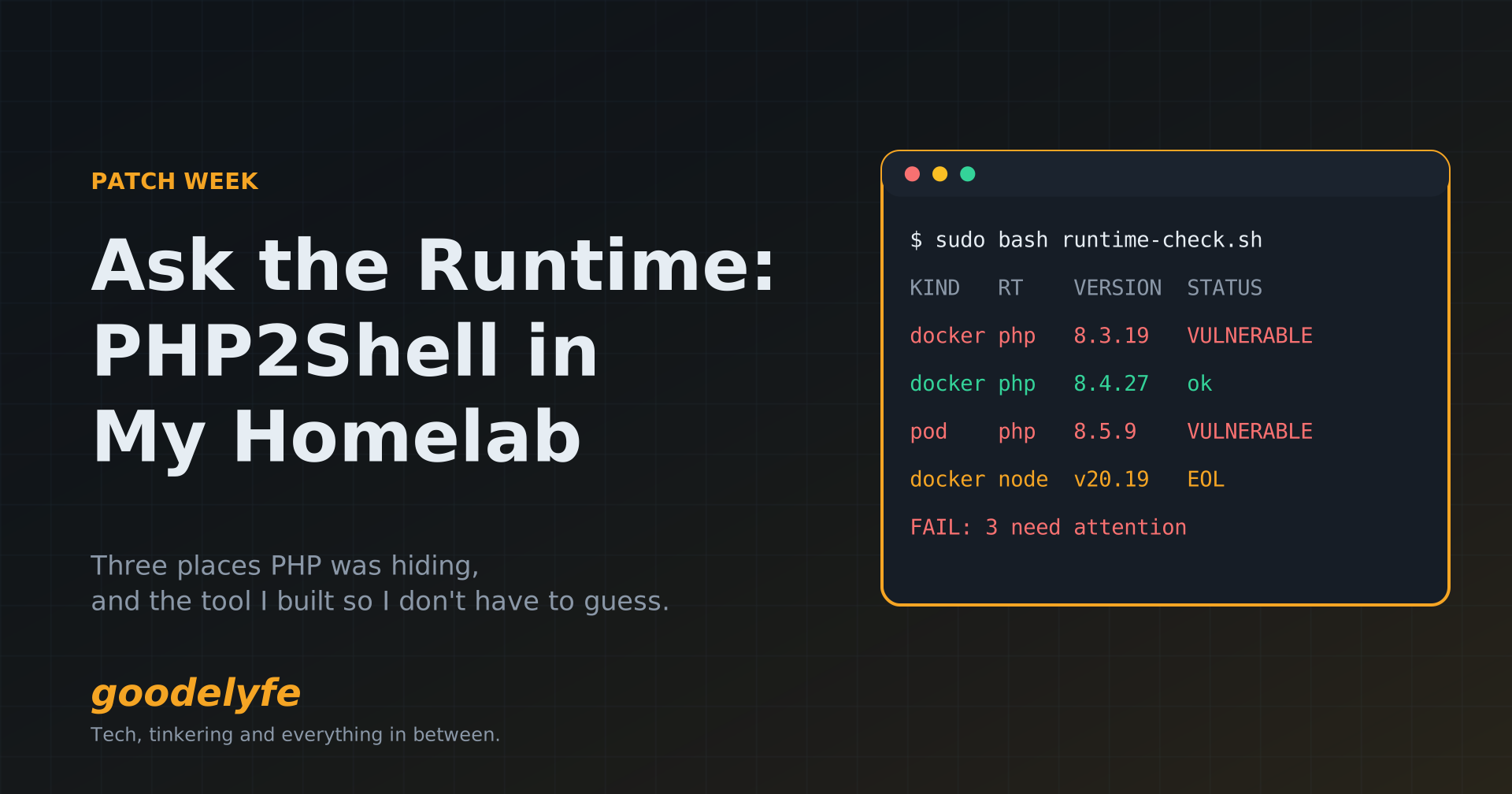
I woke up on Wednesday, October 21 to a headline nobody running PHP wants to see. There were two critical remote code execution bugs in PHP itself, and the details had leaked before the patch was out.
The PHP team had posted an advance notice the day before, with fixes scheduled for 14:00 UTC (10 AM my time). By breakfast, Sansec's running timeline showed Cloudflare reporting early attacks and deploying WAF rules.
My first thought wasn't "which version am I on?" It was "what in my homelab even runs PHP?" Most of my stack is Go, Node, Python and Java, so I thought I knew. I was wrong in three different ways. This post covers those three, plus what I built so I don't have to guess next time.
| When | What happened |
|---|---|
| Tue Oct 20 | Details of two PHP RCEs leak; PHP posts an advance notice of a security release |
| Wed Oct 21, morning | Early attacks reported; I start inventorying everything |
| Wed Oct 21, ~13:35 UTC | PHP ships 8.5.12, 8.4.27, 8.3.36 and 8.2.35, slightly ahead of schedule |
| Wed Oct 21 | Node.js ships its own security release: 26.12.1, 24.22.1 and 22.23.4 |
| Fri Oct 23, morning | Pangolin, my gateway, needs the Node fix; I take it offline until the update ships |
| Fri Oct 23 | The scripts and detection rules go public as a repo |
What PHP2Shell actually is
PHP2Shell is two bugs in the PHP runtime, both rated CVSS v4.0 9.2, that let an unauthenticated request run code on the server. Per PHP's advisory:
- CVE-2026-109618: out-of-memory handling can interrupt PHP while request data is only half set up. Cleanup then treats the broken data as valid.
- CVE-2026-109619: state that belongs to one request can outlive its freed memory. The next request on the same worker can pick it up before it gets reset.
Two things about this matter more than the CVE numbers.
It's in the runtime, not your app. PHP says the demonstrated exploit against mod_php fires before any application code runs. Your app's login page, its plugins and its hardening are never in the path. Anything serving web requests through PHP is in scope: PHP-FPM, Apache with mod_php, php-cgi, FrankenPHP and LiteSpeed.
The runtime lives inside your images. Running apt upgrade on a Docker host fixes the host's PHP and nothing else. For containers, you wait for upstream to rebuild the image, pull it, and then check that it actually changed.
The fixed versions are 8.5.12, 8.4.27, 8.3.36 and 8.2.35. PHP 8.1 and older got no official release, only minimal source backports for people who build from source.
Finding what runs PHP
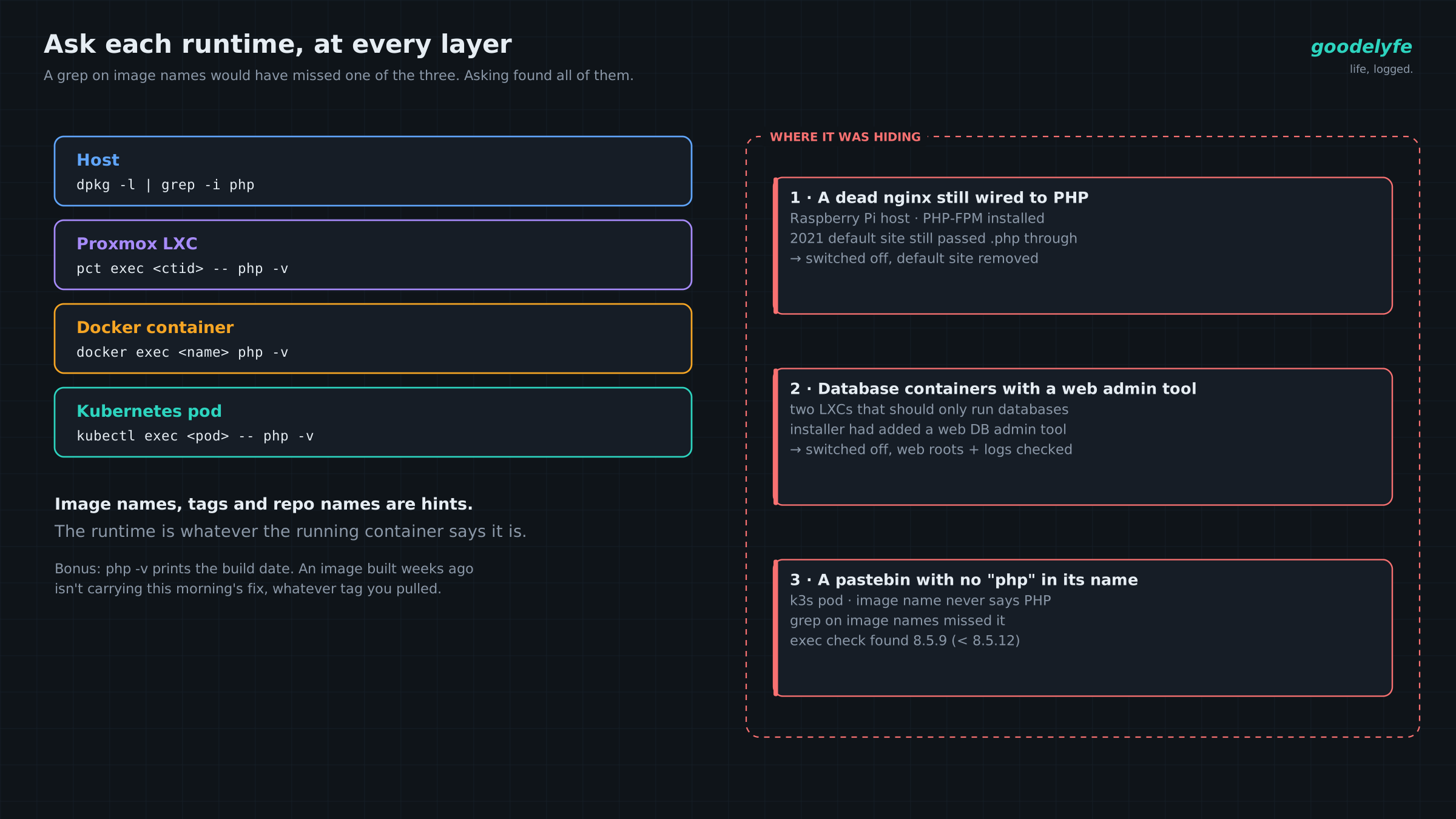
I found PHP in three places I didn't expect, and matching on image names would have missed one of them entirely.
The method that worked was asking each running thing directly. On every Docker host, this loop execs into each container, looks for a PHP binary (including versioned ones like php83), and prints the version that container reports:
docker ps --format '{{.Names}}' | while read -r c; do
  v=$(docker exec "$c" sh -c 'for b in php php85 php84 php83 php82 php81; do command -v $b >/dev/null 2>&1 && exec $b -r "echo PHP_VERSION;"; done' 2>/dev/null </dev/null)
  case "$v" in [0-9]*.[0-9]*) printf '%-35s %s\n' "$c" "$v" ;; esac
done
The case line matters more than it looks. Containers with no shell (distroless images, and plenty of Go apps) make docker exec print an "OCI runtime exec failed" error to stdout, so a plain "is it non-empty?" check prints those errors as if they were versions. Only print something that looks like a version.
The same idea works at every layer: pct exec for Proxmox LXCs, kubectl exec for pods on my k3s cluster, and dpkg -l | grep -i php on the hosts themselves.
Surprise 1: a dead nginx still wired to PHP
One of my Raspberry Pis runs DietPi, and the host itself had PHP-FPM installed. The nginx in front of it had failed at some point, and I never noticed. Its default site, a leftover from 2021, still passed .php requests to PHP-FPM.
Nothing I actually use needed it. I disabled PHP-FPM, removed the default site, and that machine dropped off the list.
Surprise 2: database containers running a web admin tool
The LXC sweep flagged PHP in two containers that should only run databases (one MariaDB, one MySQL). The installer script I used had offered to add a web-based database admin tool, and I'd said yes and forgotten. That tool brings Apache and PHP along with it.
I disabled both, then checked their web roots and access logs for dropped files or visitors I didn't recognize. There were none.
Surprise 3: the app with no "php" in its name
My first pass was the obvious one: list the images and grep for "php." It came back without PrivateBin, a pastebin that runs on PHP, because its image name doesn't mention PHP anywhere. The exec-inside check found it on the k3s cluster, reporting 8.5.9, below the 8.5.12 fix.
That's the whole lesson in one container. Image names, tags and repo names are hints. The runtime is whatever the running container says it is.
One more trick: php -v also prints the build date. The backup BookStack image on my Docker host was tagged :latest and reported PHP 8.3.19, built in March 2025. latest only means the newest image when you last pulled. An image built nineteen months ago isn't carrying a fix from this morning, whatever the tag says.
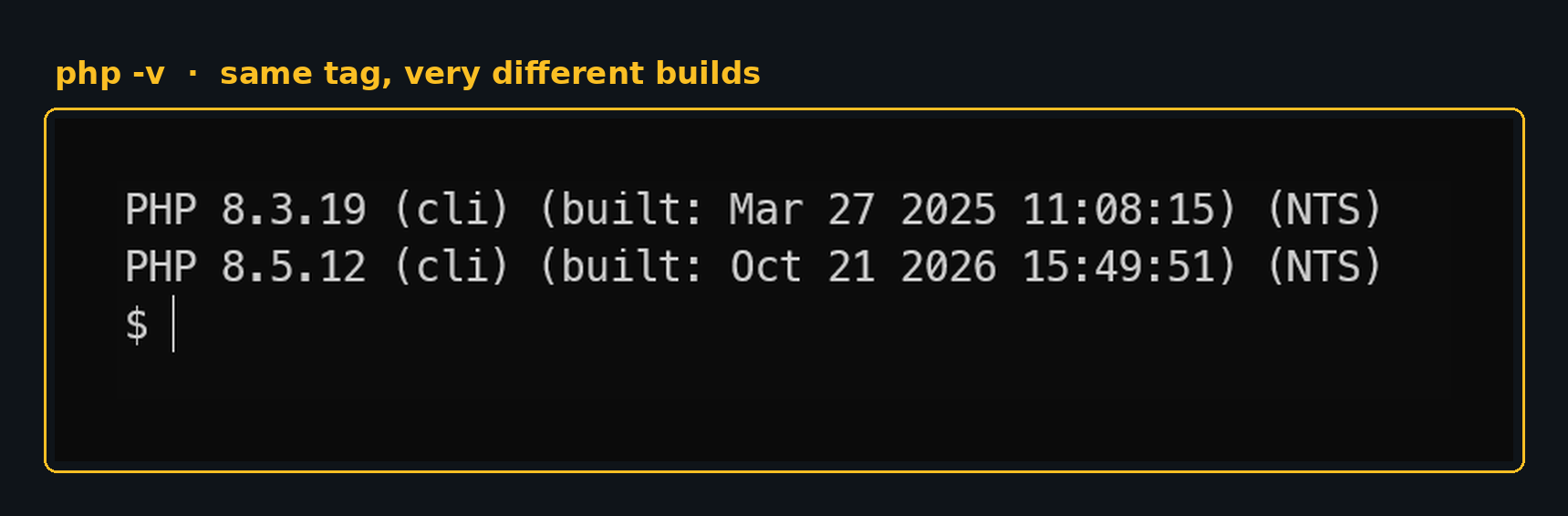
latest. One built March 2025, one built the afternoon the fix shipped.Patch, mitigate, or switch it off
Every PHP runtime I found landed in one of three buckets. The first question was always whether it served web requests at all.
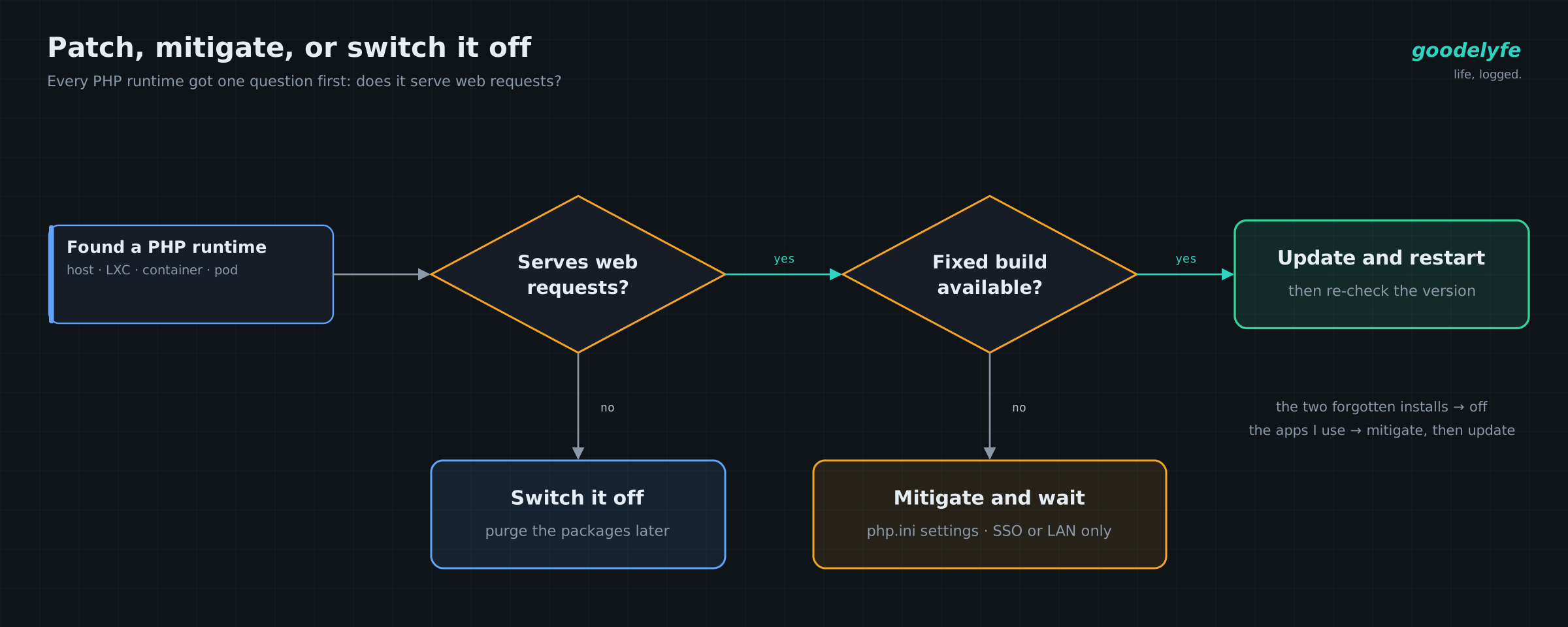
The two forgotten installs went left and got switched off. The apps I actually use sat in "Mitigate and wait" until upstream images landed, then moved to the update box.
Not serving anything: switch it off. Both forgotten installs landed here. Disabling the service took them off the attack surface immediately; purging the packages can wait.
Serving, and a fixed build exists: update, then restart properly. For host PHP, a reload or graceful restart isn't enough with mod_php; restart the service fully so every worker is new. For containers, pull, recreate, and re-run the version check. On my k3s cluster, which is GitOps-managed, the fix goes through the repo: bump the image in the manifest and let the controller roll it. A hand edit with kubectl would just get reverted.
Serving, no fixed build yet: mitigate and shrink exposure. On release day, several images hadn't been rebuilt upstream yet. PHP's advisory lists interim settings that close specific attack paths:
session.upload_progress.enabled=0, and on PHP 8.5,fatal_error_backtraces=0memory_limit=-1, enforced so apps can't override it, paired with a hard container memory limit- a low
post_max_size: 8M if the app takes no uploads, 32M if it does
Set them in php.ini or the FPM pool, not with ini_set() or .user.ini, and restart every worker. For linuxserver.io images, overrides go in /config/php/php-local.ini. For official PHP-based images, mount an ini file into /usr/local/etc/php/conf.d/.
One gotcha for host PHP: Ubuntu and RHEL backport fixes without bumping the version number. Ubuntu 24.04's PHP still reports 8.3.6 after patching, so check the package changelog for the CVE IDs before you panic.
Where Wazuh helped, and where it didn't
Wazuh was more useful for finding PHP and watching for exploitation than for proving I was patched.
Finding it. Container processes are ordinary host processes, so the Wazuh agent's syscollector sees PHP inside containers too. In IT Hygiene (Wazuh 4.13 and later; older versions call it the agent's Inventory), filter Software for php (host installs) and Processes for php-fpm, php, apache2, httpd and frankenphp. To sweep every agent at once, use the API: GET /syscollector/{agent_id}/processes?search=php.
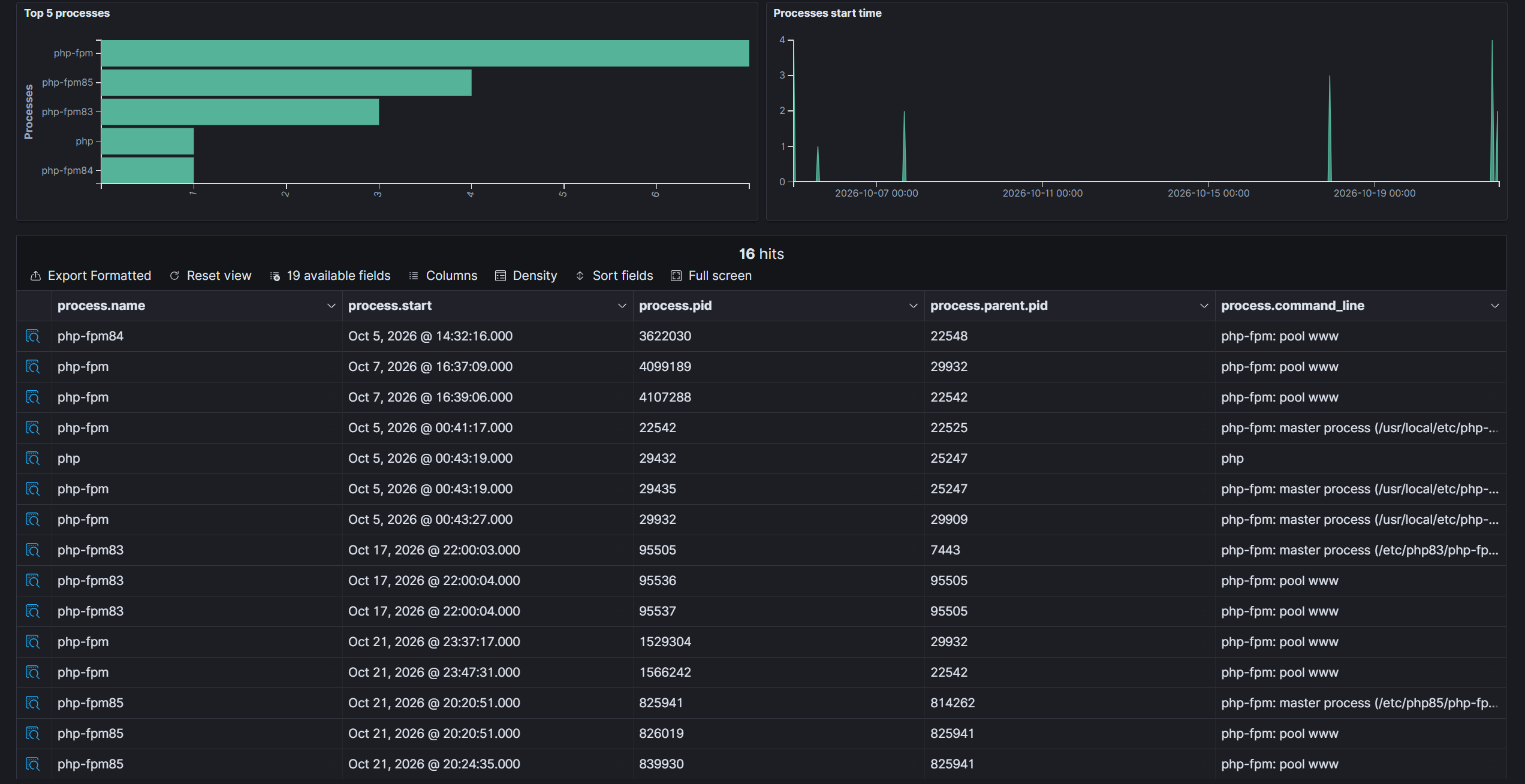
php*. The names give you the branch, not the patch.The blind spot. Wazuh's vulnerability detection is built around operating system packages. It isn't built to tell you which PHP version is compiled into an app image. Even the process list only goes so far: names like php-fpm83 and php-fpm85 tell you the branch, not whether it's 8.3.19 or 8.3.36. The exec-inside loop answered that question in seconds.
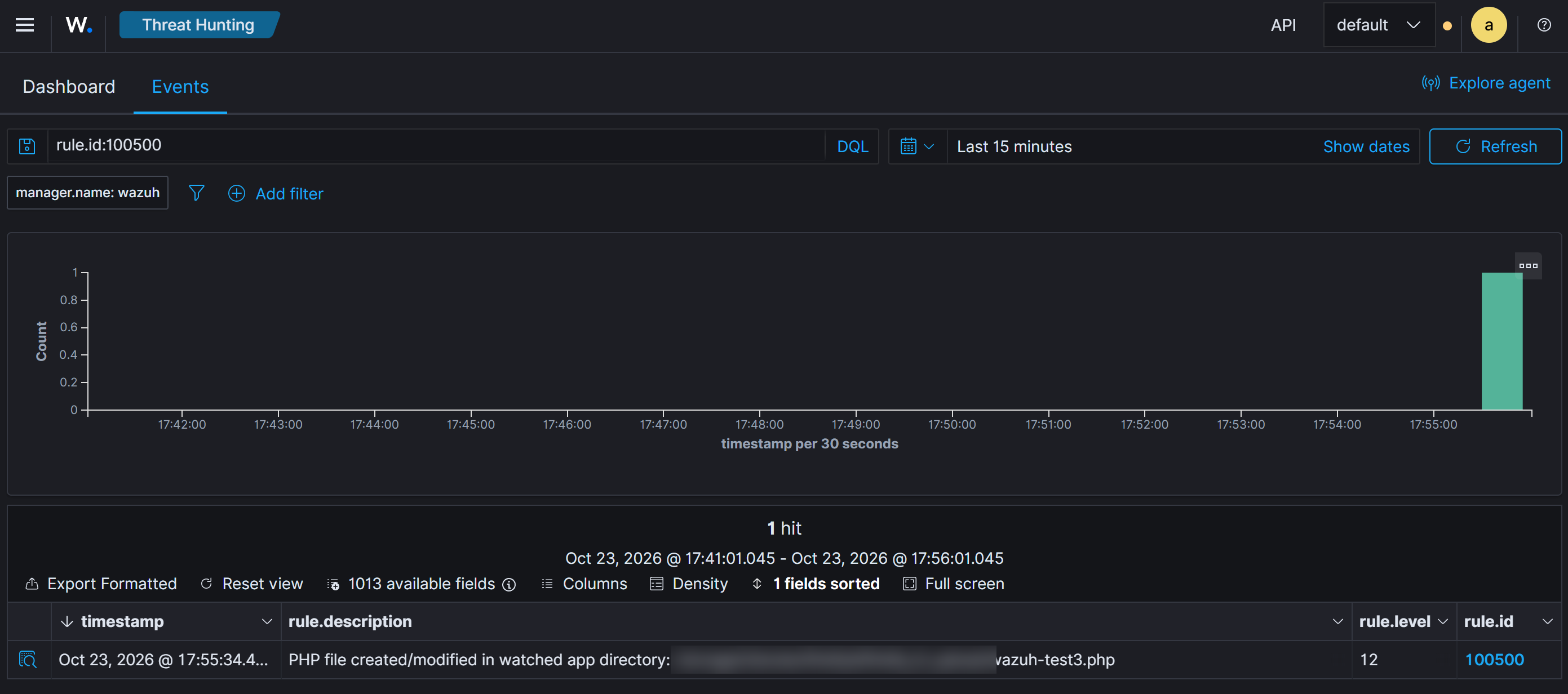
Watching for exploitation. I wrote four rules for the manager, aimed at what this exploit looks like from the outside:
| Rule | Level | Fires on | Needs |
|---|---|---|---|
| 100500 | 12 | A .php, .phtml or .phar file created or changed in a watched app directory (the classic webshell drop) | File integrity monitoring on the app directories |
| 100501 | 7 | A single PHP memory-exhaustion error or worker crash | PHP and web server logs |
| 100502 | 12 | Five of those within 2 minutes, which is what failed exploit attempts tend to look like | Rule 100501 |
| 100503 | 12 | A command executed by the web server user | The auditd rule in the repo |
Some caveats. Apps that update themselves will trip 100500 now and then. Single out-of-memory errors happen legitimately, which is why only the burst rule is high severity. The auditd rule watches uid 33 (www-data), and linuxserver.io images run as your PUID instead, so give those stacks a dedicated PUID if you want them covered.
Two things to know when you test 100500. First, after an agent restart FIM does a full baseline scan before realtime monitoring starts, and anything created during that scan goes into the baseline without an alert. Wait for Real-time file integrity monitoring started in the agent's log before you drop a test file. Second, a host-side watch only sees bind mounts and volumes, not files written inside the image's own layers.
My own test fired straight away, and the dashboard still showed nothing. The Wazuh box's disk had filled up with archived events I'd turned on and forgotten about, so the indexer had stopped taking new alerts hours earlier. The manager kept writing every alert to its local log, so nothing was lost there, but nothing new reached the dashboard either. A quiet SIEM can mean nothing is happening. It can also mean the SIEM is full. Put disk usage on the SIEM box on your alert list.
Run the rules for a day before wiring them to push alerts. The full XML, the agent config and the auditd rule are in the repo.
Meanwhile, Node.js
Node.js shipped its own security release that same Wednesday, and on Friday it reached me through the one service I can't leave exposed.
The Node.js release fixed 10 CVEs across 26.x, 24.x and 22.x, four of them rated High:
- CVE-2026-111497: an out-of-bounds write in the Brotli decoder that permits remote code execution
- CVE-2026-105483 and CVE-2026-106069: two ways around TLS certificate hostname checks
- CVE-2026-105482:
dns.resolvetruncates names that contain a NUL character
The fixed versions are 26.12.1, 24.22.1 and 22.23.4. Node 20 and 25 are end-of-life and get nothing, so the fix there is moving to a supported line. Same rule as PHP: Node lives inside your images, so check node --version in the running container, not the tag in your compose file.
Then Pangolin. Pangolin is the self-hosted gateway in front of most of my apps. It handles the tunnels, and the SSO that I'd just been relying on to cover the unpatched PHP apps. It also runs on Node.js.
On Friday morning it needed the Node fix, and the call was easy. If the front door is on a vulnerable runtime, everything behind it inherits the problem. I shut the stack down until Pangolin shipped an update on Node 24.22.1. Then I checked the version inside the new container before bringing it back up.
A few hours of my apps being unreachable from outside cost me nothing that mattered. That's the trade-off a homelab lets you make, and it's worth making on purpose.
The "fix" that would have hidden containers
The most dangerous suggestion I got all week was a confident one-line fix for a bug I didn't have.
While cleaning up the inventory loop for a post, I asked another AI assistant to review it. It told me docker exec inside a while read loop consumes the container names coming down the pipe, so the loop stalls. Its fix was to add -i.
That's backwards. Without -i, docker exec doesn't attach stdin, so it can't touch the list. With -i, the Docker client forwards the loop's stdin into the container and drains the rest of the names. The loop checks a container or two and ends. It's the same trap as running ssh inside a while read loop, where the real fix is ssh -n.
The failure mode is what makes it dangerous. Nothing errors. You get a clean exit and a short list, and a short list of vulnerable containers looks like good news.
I used AI assistants heavily throughout this response, including the one that caught this. Verify every suggestion, theirs included.
What I built: php-node-runtime-check
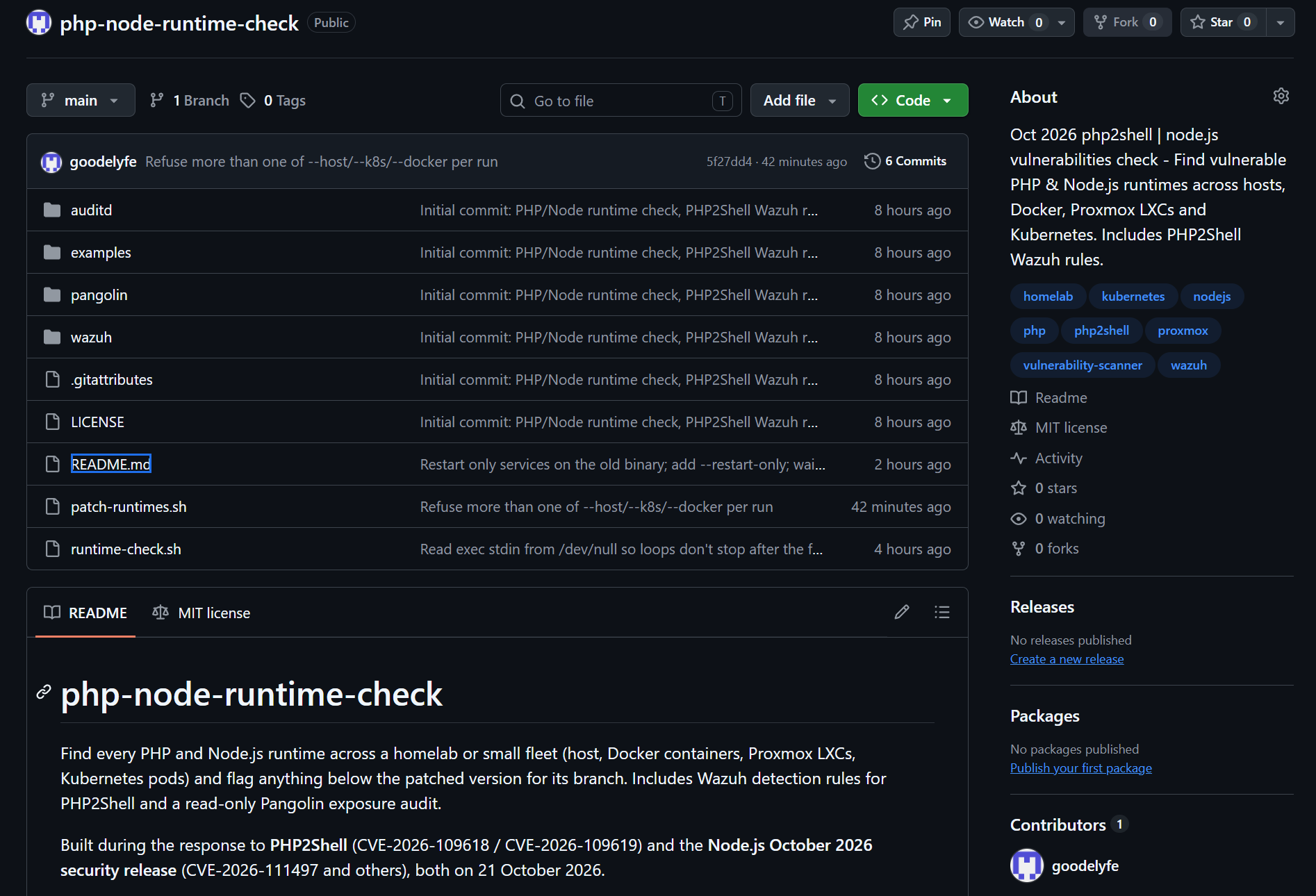
Everything from the week is in one public, MIT-licensed repo: goodelyfe/php-node-runtime-check.
| Path | What it does |
|---|---|
runtime-check.sh | Finds PHP and Node on the host, its Docker containers, Proxmox LXCs and Kubernetes pods, and flags anything below the fix for its branch |
patch-runtimes.sh | Fixes what the check finds where it can: upgrades package-installed runtimes on LXCs and hosts (snapshot first), restarts whatever is still on the old binary, and lists which deployments and compose stacks need a new image |
wazuh/rules/php2shell.xml | The four detection rules from above |
wazuh/agent-snippets.xml | Agent config for those rules: FIM paths, logs, auditd |
auditd/webshell.rules | Logs every command run by the web server user |
pangolin/exposure-audit.sh | Read-only audit of what a self-hosted Pangolin publishes, and which resources have no auth in front |
Run it on each machine. A Docker host checks its containers, a Proxmox host checks its LXCs, and anywhere with a working kubectl checks the cluster. Sections for tools a host doesn't have are skipped.
curl -fsSLO https://raw.githubusercontent.com/goodelyfe/php-node-runtime-check/main/runtime-check.sh
less runtime-check.sh        # read before you run
sudo bash runtime-check.sh
Here's what a run looks like, with made-up hosts:
KIND    LOCATION                         RT    VERSION   STATUS
docker  wiki                             php   8.3.19    VULNERABLE (<8.3.36)
docker  cloud                            php   8.4.27    ok
docker  blog                             node  v20.19.0  EOL (no fix on this branch)
pod     apps/pastebin-7d9f8c6b5-x2k4q    php   8.5.9     VULNERABLE (<8.5.12)

FAIL: 3 runtime(s) need attention
ok means at or above the fix for that branch. VULNERABLE means a supported branch below the fix, so pull, patch or rebuild. EOL means no fix exists for that branch, so move to a supported version. It exits non-zero on any finding, which makes it easy to drop into a scheduled job.
When the next advisory lands, one line drives it all:
FLOORS="php:8.2.35 php:8.3.36 php:8.4.27 php:8.5.12 node:22.23.4 node:24.22.1 node:26.12.1"It has limits. It checks each pod's default container, not sidecars. It can't see PHP in an image with no shell. And it tells you versions, not exposure, which is what the Pangolin audit is for.
Then I tried to fix it all
Writing this post meant running the script for real on every machine, and it humbled me. The Proxmox host alone turned up thirteen runtimes below the floor: one PHP and twelve Node, most of them in LXCs I hadn't thought about since I built them.
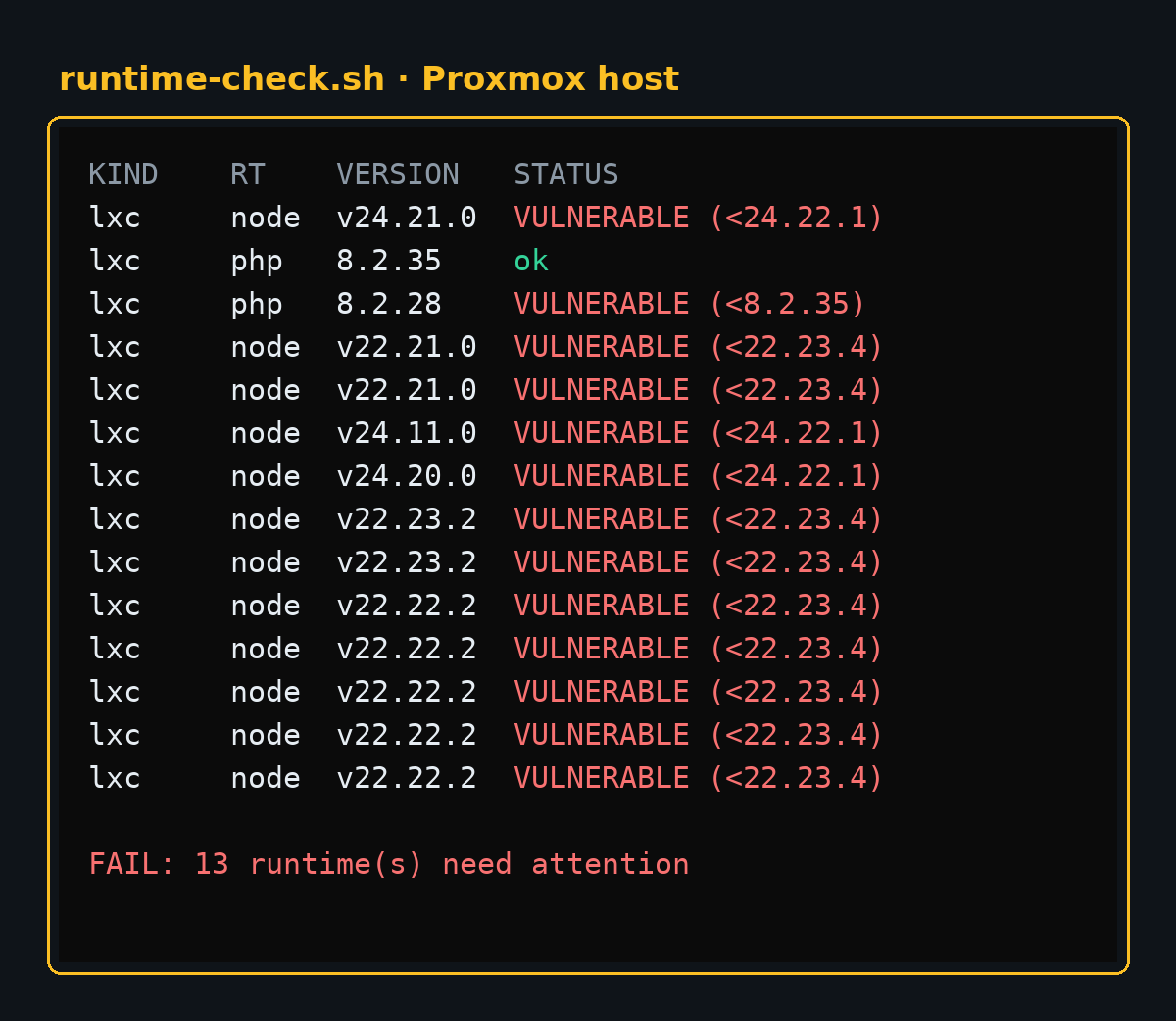
Thirteen is too many to patch by hand, so the repo gained a second script, patch-runtimes.sh. It's a dry run unless you pass --apply. For each flagged LXC it takes a snapshot, upgrades only the PHP or Node packages, restarts the services still running the old binary, and checks again. Pods and Docker containers only get a report, because you fix those by pulling a new image, and ArgoCD would undo a live edit anyway.
Three things went wrong on the way, and each one is now a fix in the script:
- Upgrading isn't restarting. A Node app keeps running the old binary until it restarts, and my first restart check looked for processes named
node. Apps that rename their process, like pm2, slipped past. Now it looks for any process whose binary was replaced during the upgrade, and restarts only those services. - A forgotten
apt full-upgradefrom two days earlier was still waiting at a changelog pager in a console I'd closed, holding the apt lock the whole time. The script now waits for the lock and turns the pager off. - A repo it could no longer verify. One Node LXC "upgraded" from 24.11 to 24.13 and stopped there. The container runs Debian trixie, whose apt has rejected keys signed with SHA1 since February 2026, and the NodeSource key in that container was one of them. So
apt-get updatehad been quietly skipping NodeSource for months, and the newest version it knew about was 24.13. Downloading NodeSource's current key fixed it. The script now printsapt-get updateerrors instead of upgrading from a stale list without saying so.
By the end of the night, here's where all four machines stood:
| Where | Flagged | After | What's left |
|---|---|---|---|
| Proxmox LXCs | 13 | 0 | nothing, services restarted |
| A small host + its pm2 apps | 1 | 0 | nothing |
| Kubernetes pods | 8 | 6 | three waiting on upstream images, three pinned tags to bump |
| Docker host | 8 | 4 | three waiting on upstream images, one on Node 20 (EOL) |
| Total | 30 | 10 |
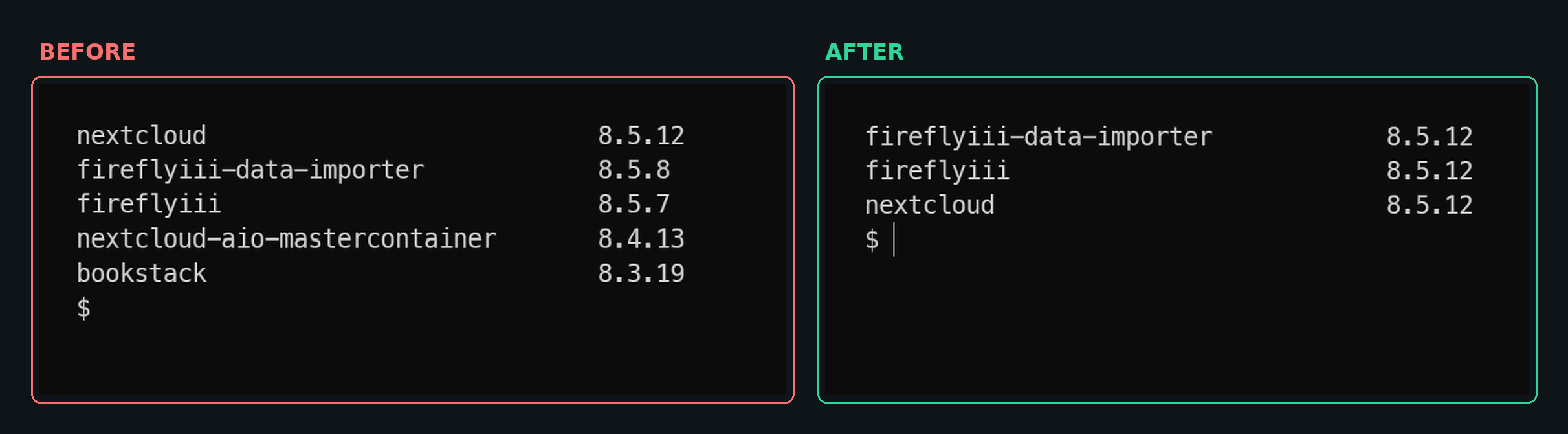
Every one of the ten left is waiting on someone else. Their images run :latest or a pinned tag, and the maintainers hadn't rebuilt on the new Node yet. Restarting a pod on :latest only gets you the newest image upstream has actually published, so I'll run the check again in a few days.
What's next, and the lesson
The script answers "what's running right now?" The next step is making it ask that question without me.
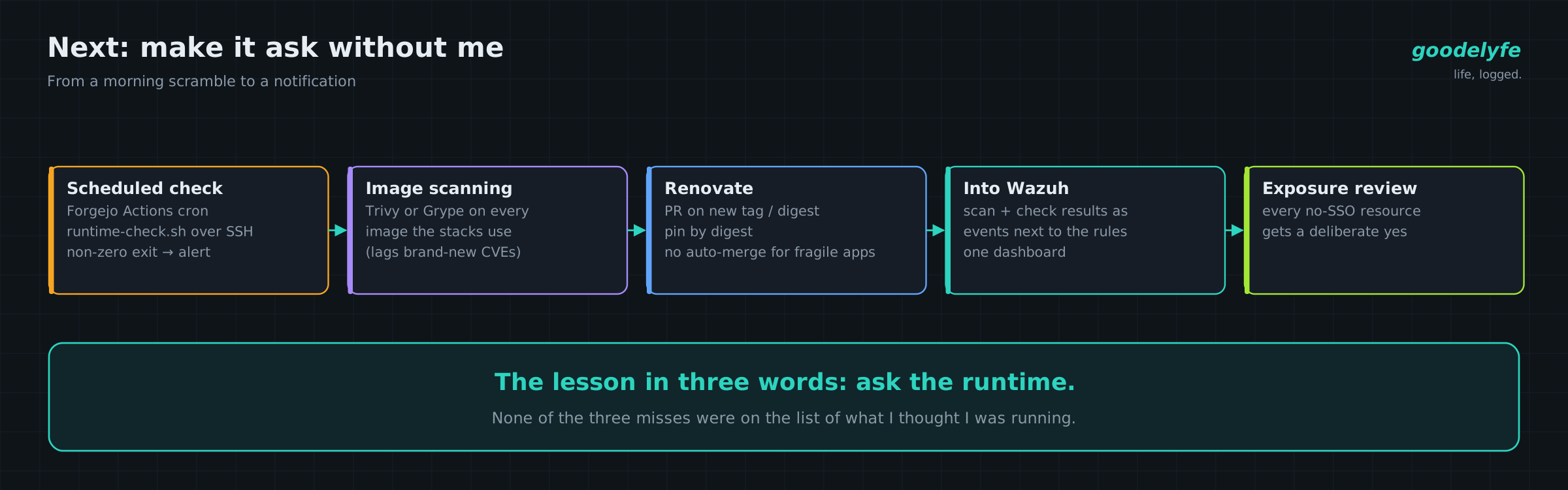
- A scheduled check. A Forgejo Actions job on a cron runs
runtime-check.shon each host over SSH. A non-zero exit becomes an alert, so the next advisory starts as a notification instead of a morning scramble. - Image scanning as a second net. Trivy or Grype against every image my stacks reference. Scanner databases lag on brand-new CVEs, which is why the runtime check comes first, but they catch everything else.
- Renovate for image updates. It opens a PR when upstream publishes a new tag or digest. I review and merge, then the deploy happens. Pinning by digest makes "am I on the patched build?" answerable from git history. I'm keeping auto-merge off for apps that tend to break on upgrade.
- Results into Wazuh. Scan results and runtime-check output land as events beside the detection rules, so it's one dashboard.
- An exposure review. The Pangolin audit also showed resources with no SSO in front. Some are intentional because the app has its own auth or has to be public. Each one deserves a deliberate yes.
The lesson fits in three words: ask the runtime. My three misses were a dead nginx still wired to PHP, a database container running a web admin tool, and a pastebin with no "php" in its name. None of them would have shown up on a list of what I thought I was running. All three showed up the moment I asked each container what it actually was.
Grab the repo, read the script first, and run it before the next advisory makes you.